Changes
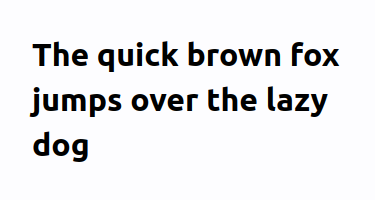
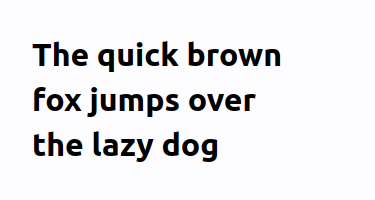
- So you have a heading that is just barely wider than the container it should fit into, and it wraps a single word to a new line and it's not really pretty?
-Cry no more, for you can use `text-wrap: balance` **today** to fix that. At least in some browsers.- +Cry no more, for you can use `text-wrap: balance` to fix that.
- When browsers encounter a text-wrapping element with `text-wrap: balance` style, they will try breaking to a new line sooner, if it balances out the width of lines.
- | `text-wrap: unset` | `text-wrap: balance` |
- |----|----|
- |  |  |
-This feature is [available in Chrome/Edge 114+](https://caniuse.com/css-text-wrap-balance), and may eventually follow in [Firefox](https://bugzilla.mozilla.org/show_bug.cgi?id=1731541) and [Safari](https://bugs.webkit.org/show_bug.cgi?id=249840).-Even with browser that don't support it yet, there is no reason to not use it today as it progressively enhances user experience.- +This feature is [available in all major browsers](https://caniuse.com/css-text-wrap-balance).
- Note that Chrome limits balancing to 4 lines of text because of performance reasons. So you can use this for headings and teaser texts while it won't work for longer paragraphs.
- ## Caveat
- It seems that under some circumstances, `text-wrap: balance` together with `word-break: break-word` can cause premature word-breaking, i.e. words will be split while they would not have to be. We are unsure when exactly that happens, but it seems to occur on narrow viewports. (⇒ [Example](https://codepen.io/foobear/pen/LYMWoQY))
- We have never seen that on blocks where hyphenation was enabled with `hyphens: auto`. If you feel the need for force-breaking words, adding `hyphens: auto` may be a good default anyway -- at least on small viewports.

Posted by Niklas Hasselmeyer to makandra dev (2026-08-26 07:18)